Software updates
Updating the software ensures it stays up to date with the latest features and improvements. Software updates are primarily done over the air (OTA) and all previous updates are included when you install one.
All updates are available for installation from the release date at your Volvo dealer or an authorised Volvo workshop.
Keep in mind that you may be charged for the installation unless it’s included in a repair or service agreement.Note
If an update isn’t available over the air you don’t have to schedule an appointment but can just wait until the next over-the-air update is available. If an update isn’t available in your car, you already have the latest version.
Features and functionality after updating may vary depending on market, model, model year and options.
Updates in software 5.0.5
Software release date: 2026-02-16
This update will be available as an over-the-air download about three weeks after the software release date.Note
After installing this update, you may have to pair your Bluetooth devices again. If a device appears in the list of paired devices it might not be possible to connect using that device. To resolve this, remove the old pairing and pair the car and phone again.Important
New features
Improvements
Volvo Cars app
- You can connect your Volvo ID to your car in the app, so you can access it from any device. You can also invite other users to link their accounts for a seamless shared experience.
- You can also connect your account to your car by scanning a QR code in the centre display.
General
- The car keys can be connected directly to an account when setting up a new car. This ensures that your preferences are carried over automatically.
- General infotainment enhancements, including better centre display stability and audio performance
- Improvements to Bluetooth connection and automatic reconnections, and contact synchronisation between your phone and the car
- Improvements to internet connectivity via your mobile network operator
- Enhanced Apple CarPlay USB switching functionality
- Fixed an issue with downloading apps in the Google Play store
- Fixes to the issue where maps didn’t show correctly in the centre display. In future releases, we will address remaining issues, including the purple map area in the United States and issues related to GPS.
Updates in software 4.2.13
This update will be available as an over-the-air download about three weeks after the software release date.Note
- This update includes minor refinements and stability improvements.
Updates in software 4.1.3
This update is only available in workshops and not as an over-the-air download.Note
This update includes compatibility upgrades to make sure the car is ready for the latest features and hardware. This helps maintain serviceability, reliability and optimal performance (only for late model year 2025 and later XC90s and model year 2026 S90Ls).
Updates in software 3.7.0
This update will be available as an over-the-air download about three weeks after the software release date.Note
- Improvements and bug fixes
Updates in software 3.6.4
Note
This update will be available as an over-the-air download about three weeks after the software release date.
This update is only available in workshops and not as an over-the-air download.
- Improvements and bug fixes
Updates in software 3.5.27
This update is only available in workshops and not as an over-the-air download.Note
- Improvements and bug fixes
Updates in software 3.5.24
Note
This update will be available as an over-the-air download about three weeks after the software release date.
If you experience connection issues between the car and the Volvo Cars app after installing this update, try driving the car around for a bit. This usually resolves any connectivity problems.Important
- Updates to the parking view camera (only for MY24 and MY25 cars with the 360 camera)
- Improvements and bug fixes
Updates in software 3.5.15
This update is only available in workshops and not as an over-the-air download.Note
- Improvements and bug fixes
Updates in software 3.5.14
This update is only available in workshops and not as an over-the-air download.Note
Intelligent speed assist is now visible in the driver display (only for model year 2024 and later cars).
The foot brake should feel less stiff right after starting the car.
- Lane keeping aid
- Road sign information speed limit prediction
- Tyre pressure monitoring (iTPMS)
- Interior lights (only for model year 2025 and later cars)
Updates in software 3.4.4
This update is only available in workshops and not as an over-the-air download.Note
Intelligent Speed Assist
We’ve updated the symbol for Intelligent Speed Assist.

Other improvements
The availability of remote functions in the Volvo Cars app, such as locking, unlocking and parking climate control has been extended. These functions are now available 22 days after you’ve left the car.
We’re introducing picture-in-picture (PiP) for model year 2024 cars equipped with the 360 camera. When you’re using the parking view, the assisted parking lines in the picture-in-picture rear view will change lengths depending on the overlay position in the centre display. This is only applicable for cars that have the picture-in-picture view.
Arabic is added as a system language.
Reintroduction of the ETA symbol in the driver display.
Updates in software 3.3.19
This update is only available in workshops and not over the air (OTA).Note
- General stability improvements.
Updates in software 3.3.17
Note
After installing this update you’ll have to save a new reference value for the Indirect Tyre Pressure Monitoring System (iTPMS). To do this, press the app library symbol
and go to Car status, then select Store pressure.
You can read more about iTPMS in the user manual.
General improvements
If you see a message in the driver display saying that air suspension is turned off, it will automatically turn back on once you start driving. You can also turn it on in the centre display.
Road sign information might show the wrong number during start-up after updating. This will reset once the car gets a new value from the camera or the map.
- Road sign information performance.
- Camera image brightness for model year 2024 and later cars.
- Drivetrain and power supply that do not affect performance or emissions.
Updates in software 3.2.8
Note: The release of this software is only to accommodate a hardware change in production. The SW content in this update is identical to 3.2.4:
- Compatibility update
Updates in software 3.2.5
Improvements and bug fixes
This update includes support for the panoramic roof introduced for model year 2023 and later cars.
Updates in software 3.2.4
Improvements and bug fixes
Drive system and power supply adjustments that do not affect performance or other certified properties.
Updates in software 3.1.10
We’ve fixed an issue where the car sometimes didn’t detect the key when it was started. This only applies to late model year 2024 and later cars.
Updates in software 3.1.9
We’ve made some improvements to the stability of the infotainment system. As a result of this, you might notice that the map no longer appears in the driver display when you shift into reverse gear (R).
This update also includes some bug fixes that do not affect performance or other certified properties.
Updates in software 3.0.3
Android Automotive OS 12
This update includes support for Android Automotive OS 12. After installing you’ll have new features like:
- A microphone icon in the top bar when you’re using the microphone.
- Road Sign Information being available if you lose your internet connection, like when going through a tunnel.
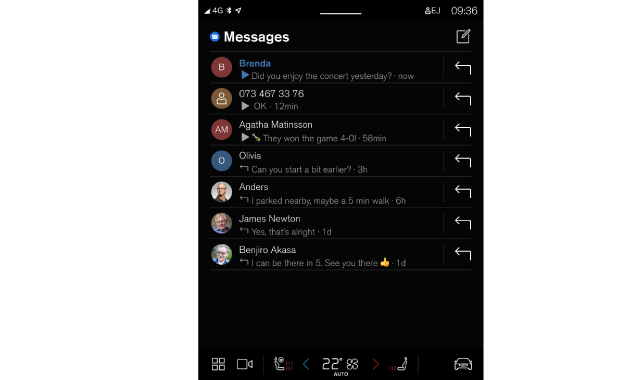
- Improvements to the voice assistant, including a new application that lets you interact with your latest messages via the centre display.
Improvements and bug fixes
- The rear auto brake is now smoother when reversing. This is only relevant in model year 2024 cars produced after 23w46.
- Turning on preconditioning now also heats the steering wheel for model year 2023 and earlier cars. Model year 2024 cars got this feature in the last update.
- Improvements to traffic sign recognition in Europe. This is only relevant in model year 2024 cars produced after 23w46.
- Heat icons now work correctly when the parking camera view is open.
- An update to the Security Patch Level (SPL).
- Drive system and power supply adjustments that do not affect performance or other certified properties.
Updates in software 2.14.3
- The LED light in the charging port now improved: It shines when the car wakes up. It blinks in the forms of respiration light while charging (only for model year 2024 cars).
- There have been several minor drive system and power supply adjustments that do not affect performance or other certified properties.
Updates in software 2.13.3
Updating the software to the latest version also includes previous updates.
Improvements and bug fixes
- Steering wheel heating is now activated automatically during preconditioning in MY24 cars equipped with steering wheel heating.
- Bug fixes for MY24 cars.
Updates in software 2.13.1
Improvements and bug fixes
- The issues with the radio having no sound and taking a long time to start have been improved. After installing this update the radio favourites for all user profiles will be reset and you will have to save your favourite channels again.
- The Park Assist Camera (PAC) can be switched off with the rear camera view button when starting to reverse (not for cars with a 360° PAC).
- Improved image quality in low-light conditions for the 360° Park Assist Camera (PAC) (MY24 only).
- There have been several minor drivetrain adjustments that do not affect performance, certification, homologation, environmental protection, or emissions.