Pilot Assist communication and status
Learn how Pilot Assist's status and actions are communicated in the vehicle.
The instrument panel shows the status of Pilot Assist using graphics and symbols. Important information can also appear as notifications.
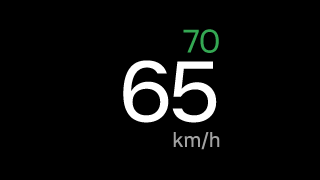
The primary status is shown next to the speedometer. It tells you whether Pilot Assist is active or not.
The target speed appears in green above the speedometer.
Communication with symbols
The symbols show what level of support Pilot Assist is currently providing based on your Pilot Assist settings.
 | Pilot Assist without steering assistance is available to activate if all conditions are met. |
 | Pilot Assist with steering assistance is available to activate if all conditions are met. |
 | Pilot Assist is active but steering assistance is disabled in settings. |
 | Pilot Assist is active and providing steering assistance. |
 | Pilot Assist is active but hands are not detected on the steering wheel. This is the first warning and it appears along with a message. The warning remains in the instrument panel until you place your hands on the steering wheel. |
 | If hands are still not detected on the steering wheel after the first warning, a second warning appears along with a message and a sound. Pilot Assist will deactivate if you don't place your hands on the steering wheel. |
 | An assisted lane change is available. The arrow indicates the direction of the available lane change. |
 | A lane change is ongoing. The path indicates the direction of the initiated lane change. |
 | Lane change assist is unavailable, and any ongoing lane change is canceled. This may occur if there is a fault affecting critical systems or capabilities needed for assisted lane changes, such as steering assistance. Be attentive to any messages that may follow. |
 | An ongoing lane change maneuver is canceled. This may occur if you perform an action that overrides lane change assist. Be attentive to any messages that may follow. |
 | Steering assistance is temporarily unavailable. |
 | Pilot Assist is adapting the driving speed to a vehicle ahead. |
 | Your selected time interval to a vehicle ahead. |
 | Curve speed assist is active, and Pilot Assist is adapting the driving speed to a curve. The arrow indicates if it is a left or right turn. |
 | Curve speed assist is active, and Pilot Assist is adapting the driving speed to a traffic circle. |
 | Curve speed assist is active, and Pilot Assist is adapting the driving speed to an intersection. |
 | Pilot Assist is preventing high-speed passing to the right of another vehicle. |
 | The suggested target speed is confirmed, and Pilot Assist is adapting the vehicle’s speed to the suggested speed. The symbol appears above the speedometer, next to the target speed. |
Communication in surround display mode
When the instrument panel is in surround display mode, Pilot Assist status and actions are shown as animations. The animations can show what level of support Pilot Assist is currently providing, depending on your Pilot Assist settings. This may include speed-keeping, distance-keeping, adjusting the speed to other vehicles ahead and availability of steering assistance.
Important
Using surround mode
Surround mode cannot perfectly depict what is really happening on the road around you, so do not rely on it when you are driving.
Notifications and messages
When using Pilot Assist, notifications may appear in the instrument panel. They may contain important information about the status of Pilot Assist features, as well as instructions for you to follow, such as not letting go of the steering wheel.