Restarting your car's central computer
You may experience unexpected issues with your car, such as charging it. Restarting your car's central computer can help resolve these issues, just like a restart of your phone or laptop might.
You can restart your car's central computer by initiating an automatic restart. If the issue persists, you can try performing a manual restart.
Note
This article is applicable to EX90, ES90 and EX60 cars.
For more customised information about your car, press Sign in at the top of the page.
Initiating an automatic restart
- Step out of your car and lock it.
- Move at least 20 metres away from your car. If the distance between your car key and your car is less than this, the car will remain in standby mode and won't fully shut down.
- Keep the distance for a minimum of 15 minutes.This will initiate a restart of your car's central computer.
- Return to your car and start it.
If the automatic restart didn't resolve the issue, try performing a manual restart.
Performing a manual restart
Important
Please read the instructions before proceeding. It's recommended to only try performing a manual restart if you're having difficulty charging your car.
Before starting the procedure, stop any active charging session and disconnect the charging cable.
The central computer can only be restarted once every 15 minutes.[1]
Note
Pause media
Make sure to pause any media before starting the procedure. During the restart process, you need to use the volume controls. If media is playing, the volume may increase to its maximum level and remain there until the procedure is complete.
Press the button marked P on the right-hand steering wheel stalk.
- Press and hold the brake pedal.
Simultaneously press and hold the decrease speed
 and increase volume
  buttons on the steering wheel.
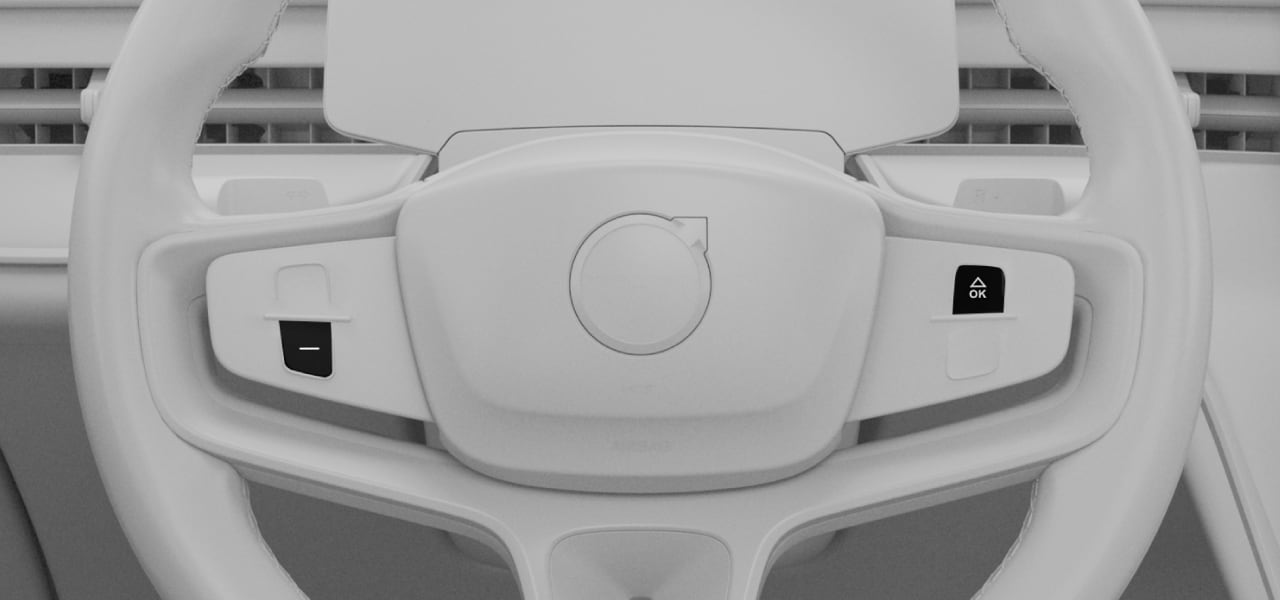 After approximately 10 seconds, the restart is initiated. The driver display may briefly go black or show a Starting up message.
When the driver display changes, release both buttons on the steering wheel and your foot from the brake pedal.
The restart takes around 1 minute to complete. When the driver display returns to its normal view, the restart is complete.Certain warning messages may appear in the driver display after the restart. This is temporary and will disappear once the car has been locked and shut down completely.Note
- Once the restart is complete, open and close the driver's door before driving the car.
If you need further assistance or if a manual restart didn't solve your issues, contact Volvo support.